

Autonomous Browser Agents Are the Next Interface Shift
Top Autonomous Browser Agents, No-Code Automation Tools & AI-Native Workflow Platforms (2026 Guide)
Why Autonomous Browser Agents Are the Next Interface Shift
Autonomous browser agents represent a structural shift in how humans interact with the internet.
Instead of:
Clicking
Typing
Navigating
Repeating tasks
You delegate outcomes.
A modern browser agent can:
Interpret intent in natural language
Navigate unknown websites
Handle multi-step flows
Recover from errors
Decide next actions autonomously
This is not “automation.”
This is delegation of agency.
What Is a Fully Autonomous Browser Agent?

A fully autonomous browser agent is an AI system that can:
✔ Open and control a real browser
✔ Understand goals (not scripts)
✔ Plan multi-step actions
✔ Adapt to UI changes
✔ Execute tasks end-to-end
Unlike no-code automation tools, these agents reason before acting.
Automation Has Crossed a Line
Automation is no longer about “saving time.”
It is about delegation.
In 2026, the most advanced AI systems do not just assist you—they act on your behalf:
- They browse the web
- Fill forms
- Apply for jobs
- Run SaaS workflows
- Trigger decisions
- Coordinate tools
- And increasingly… replace entire operational roles
But not all automation tools are equal.
To choose correctly, you must understand four distinct categories:
- Fully Autonomous Browser Agents
- No-Code Browser Automation Tools
- AI-Native Workflow Automation Platforms
- Deep Automation Frameworks (Full Control)
This guide breaks each category down clearly, lists the top tools, and—most importantly—explains what each can and cannot do.
1. Fully Autonomous Browser Agents
(“Do it for me” AI)
What They Are
Fully autonomous browser agents are AI systems that can:
- Open a browser
- Understand a goal in plain English
- Decide actions step-by-step
- Navigate websites dynamically
- Handle errors
- Retry intelligently
- Complete tasks end-to-end
You do not design workflows.
You give objectives.
Think of them as AI interns with a browser.
Top Fully Autonomous Browser Agents
1. OpenAI Operator / Browser Agent
Best for: General-purpose autonomous web tasks
Can do
- Navigate complex websites
- Fill multi-step forms
- Interact with dashboards
- Adapt to layout changes
- Handle popups, logins, CAPTCHA (limited)
Cannot do
- Guaranteed success on anti-bot protected sites
- Large-scale parallel automation
- Deterministic enterprise workflows
2. Browser Use (Open-source agent framework)
Best for: Developers building custom browser agents
Can do
- Autonomous browsing
- DOM reasoning
- Tool calling
- Multi-step planning
- LLM-controlled navigation
Cannot do
- No-code setup
- Production stability without engineering
- Compliance-ready automation
3. AgentGPT / Auto-GPT (Browser-enabled variants)
Best for: Experiments and research
Can do
- Goal-driven web research
- Autonomous task loops
- Self-prompting actions
Cannot do
- Reliable production use
- Long-running tasks without supervision
- Commercial-grade stability
When to Use Autonomous Browser Agents
Use them if:
- The task is unstructured
- Websites change frequently
- You don’t want to build workflows
- Human-like reasoning is required
Do not use them for mission-critical enterprise automation.
2. No-Code Browser Automation Tools
(“Build once, run many times”)
What They Are
These tools let you visually record or design browser actions:
- Click
- Type
- Scroll
- Extract data
- Submit forms
They are deterministic, repeatable, and scalable.
Top No-Code Browser Automation Tools
1. UI.Vision RPA
Best for: Browser + desktop automation without coding
Can do
- Visual automation
- OCR-based interactions
- Web scraping
- Form filling
- CAPTCHA solving (via services)
Cannot do
- Adaptive reasoning
- Handle major UI changes automatically
- Natural language planning
2. Browserflow
Best for: Chrome-based automations
Can do
- Record browser actions
- Schedule automations
- Export workflows
- Integrate APIs
Cannot do
- Complex conditional logic
- Multi-app orchestration at scale
- Deep AI decision-making
3. Axiom.ai
Best for: Google-centric automation
Can do
- Automate websites
- Integrate with Google Sheets
- Data extraction
- Simple logic branches
Cannot do
- Autonomous planning
- Complex error recovery
- Heavy enterprise use
When to Use No-Code Browser Automation
Use them if:
- The website structure is stable
- Tasks repeat often
- You want predictability
- You don’t want to code
Avoid them when sites change daily or logic is complex.
3. AI-Native Workflow Automation Tools
(“Let AI run the workflow”)
What They Are
These platforms combine:
- APIs
- Triggers
- Conditions
- LLMs
- Memory
- Agents
They are the operating systems of AI automation.
Top AI-Native Workflow Tools
1. n8n (with AI Agents)
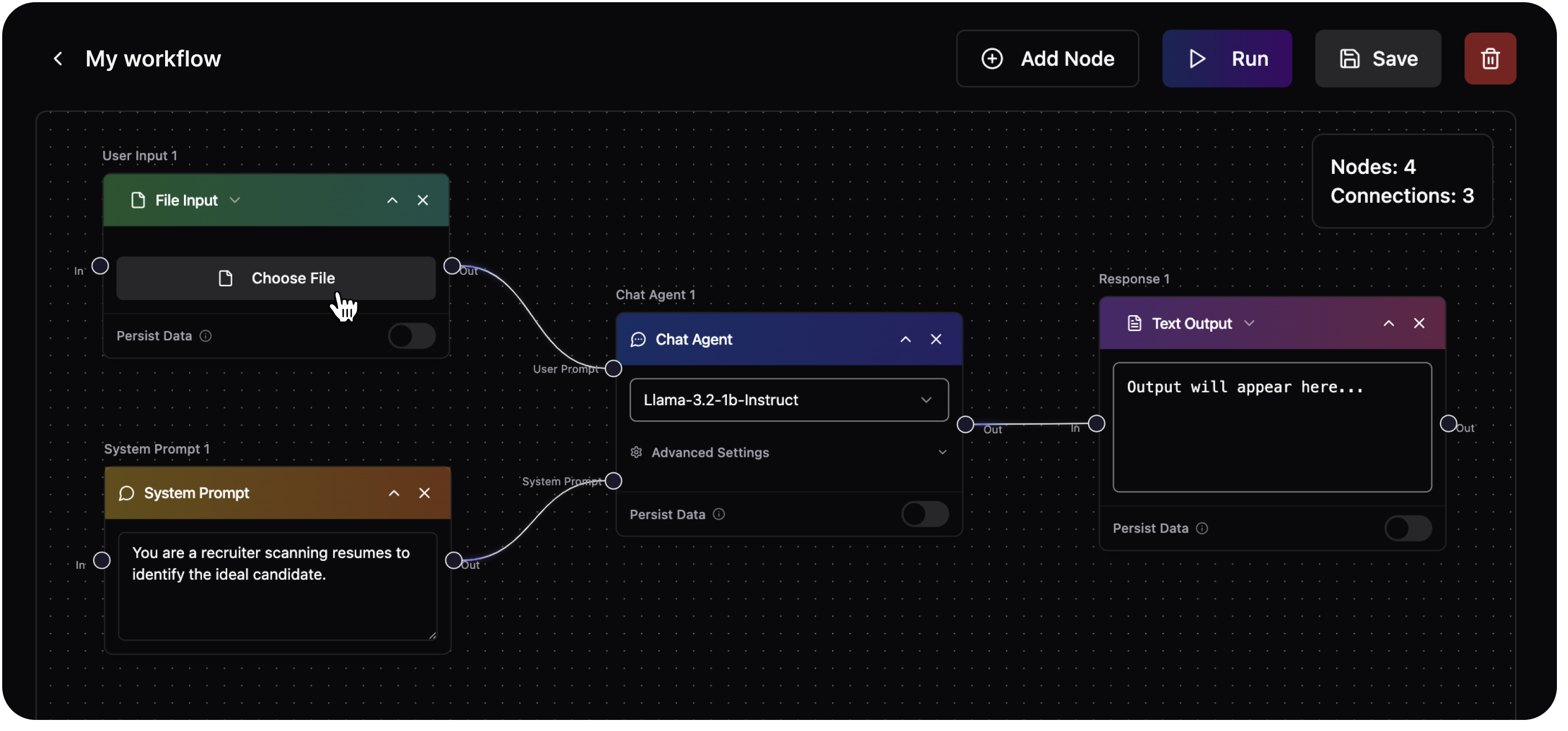
Best for: Full control, open-source automation
Can do
- Build complex workflows
- Integrate 400+ services
- Use AI agents inside flows
- Handle branching logic
- Run self-hosted or cloud
Cannot do
- Autonomous browser reasoning by default
- Zero-setup automation
- Non-technical users at scale
2. Make.com
Best for: Visual, scalable SaaS automation
Can do
- Multi-app workflows
- Conditional logic
- AI API integration
- Scheduling and monitoring
Cannot do
- Deep AI agent autonomy
- Browser-level intelligence
- Open-source customization
3. Zapier (with AI Actions)
Best for: Business automation
Can do
- Simple automations
- AI-powered text handling
- Thousands of integrations
Cannot do
- Complex multi-agent systems
- Cost-efficient large-scale automation
- Deep customization
When to Use AI-Native Workflow Tools
Use them if:
- You are automating systems, not websites
- You need reliability
- You want logs, retries, analytics
- You plan to scale
4. Deep Automation Frameworks (Full Control)
(“Build your own automation engine”)
What They Are
These are developer-grade frameworks that give you total control:
- Browsers
- Agents
- Memory
- Tools
- Infrastructure
They are powerful—but demanding.
Top Deep Automation Frameworks
1. Playwright + AI Agents
Best for: Enterprise-grade browser automation
Can do
- Precise browser control
- Headless execution
- Parallel runs
- Custom AI reasoning layers
Cannot do
- No-code usage
- Quick setup
- Non-technical teams
2. LangChain / CrewAI / AutoGen
Best for: Multi-agent AI systems
Can do
- Agent collaboration
- Tool calling
- Memory
- Planning systems
Cannot do
- Browser control without integration
- Production stability out of the box
3. OpenAI + MCP (Model Context Protocol)
Best for: Future-proof agent ecosystems
Can do
- Tool-agnostic agent control
- Secure context sharing
- Cross-tool intelligence
Cannot do
- Immediate plug-and-play automation
- No-code accessibility
When to Use Deep Frameworks
Use them if:
- You are building a product
- You need compliance
- You want total control
- You have engineering resources
Comparison Table (Quick Decision Guide)
| Category | Ease | Intelligence | Scale | Reliability |
|---|---|---|---|---|
| Autonomous Browser Agents | Very High | Very High | Low–Medium | Medium |
| No-Code Browser Automation | High | Low | Medium | High |
| AI-Native Workflow Tools | Medium | High | Very High | Very High |
| Deep Automation Frameworks | Low | Very High | Unlimited | Very High |
What Autonomous Browser Agents CAN Do
✔ Navigate unknown websites
✔ Fill complex forms
✔ Adapt to UI changes
✔ Handle conditional flows
✔ Retry intelligently
What They CANNOT Do (Yet)
✖ Guaranteed CAPTCHA bypass
✖ Mass-scale automation cheaply
✖ Compliance-critical workflows
✖ 100% accuracy on hostile sites
Final Recommendation by Use Case
- Job applications / form filling: Autonomous browser agents
- Repetitive website tasks: No-code browser automation
- Business process automation: AI-native workflow tools
- Startups / platforms / SaaS: Deep automation frameworks
Why ProAITools Curates These Tools
At ProAITools.net, we do not just list tools—we classify intelligence.
Our goal is to help users:
- Understand capabilities
- Avoid false promises
- Choose the right automation layer
- Prepare for an AI-first future
Automation is no longer optional.
Choosing the wrong type is costly.





Comments
24
Solid suggestions — would be great to see a downloadable checklist.
I tried the method and had positive results — thanks for sharing!
Helpful and well-organized. Subscribed to your newsletter.
Pretty! This has been a really wonderful post. Many thanks for providing these details.
Thanks for the breakdown — the comparisons were particularly useful.
Very helpful explanation — I learned several useful techniques.
Thank you for such a thorough and thoughtful article.
Very well presented. Every quote was awesome and thanks for sharing the content. Keep sharing and keep motivating others.
Nice post. I learn something totally new and challenging on websites
I do not even understand how I ended up here, but I assumed this publish used to be great
Your writing style is engaging and easy to follow. Keep it up!
Thanks for the detailed breakdown — it saved me a lot of time.
Well-written and insightful. Would love to see case studies next.
Useful tips and friendly tone — a winning combination. Thanks!
Nice article! I especially liked the actionable checklist.
I found this very informative. Bookmarked! I�m from Yakutia and interested in a link exchange.
For the reason that the admin of this site is working, no uncertainty very quickly it will be renowned, due to its quality contents.
This is my first time pay a quick visit at here and i am really happy to read everthing at one place
Excellent points. Thanks for the info!
Nice post. I learn something totally new and challenging on websites
Hi there to all, for the reason that I am genuinely keen of reading this website’s post to be updated on a regular basis. It carries pleasant stuff.
I very delighted to find this internet site on bing, just what I was searching for as well saved to fav
Really useful stuff. I’ve bookmarked this page. Hello from Yakutsk! Down for a link exchange?
I’m often to blogging and i really appreciate your content. The article has actually peaks my interest. I’m going to bookmark your web site and maintain checking for brand spanking new information.